

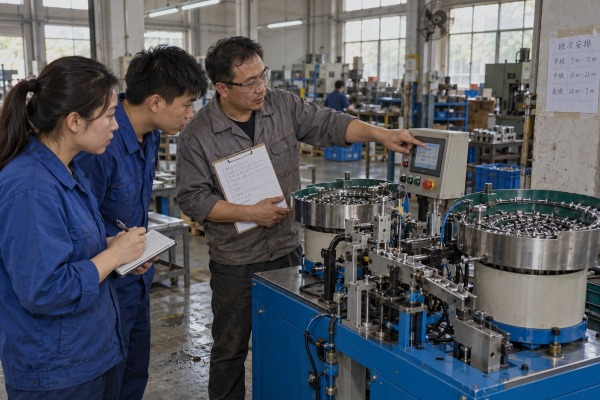
Our Wenzhou engineers have watched buyers request operator training from an automatic assembly machine supplier in one vague line, then struggle when the ferrule machine jams on night shift.
Request operator training from your automatic assembly machine supplier as a written, priced contract deliverable. Specify machine configuration, trainee roles, shifts, languages, hands-on hours, curriculum, competency tests, documentation, and refresher terms. Confirm every item before payment, and tie completion to site acceptance.
That is the short answer. The rest of this article shows how to build that request step by step. I will cover what to write, how long it takes, where it should happen, and what paperwork to demand. I will also share the one rule we apply on every order we ship: clarify the service scope before payment, and put it in the contract.
A distributor in Mexico once sent us a purchase order that said only "training included." We sent back a two-page questionnaire before we quoted a single day.
Include the machine model and installed options, number of operators and shifts, skill levels and languages, actual parts and materials, target cycle time, changeover frequency, quality checks, site safety rules, which other roles need training, and the training date relative to commissioning and acceptance.

The reason that questionnaire exists is simple. A supplier reads "training" as a handover demonstration. A buyer reads it as operators running three shifts alone. Those two readings cost very different amounts of money. The request has to close that gap.
Here is the information we ask for on a custom cable lug or ferrule assembly machine. Every line changes how we plan the course.
| Information to provide | Why the supplier needs it |
|---|---|
| Machine model, configuration, installed options | Vision system 1s, reject stations, and extra bowl feeders each add modules |
| Number of operators and shifts | Decides repeat sessions and instructor-to-trainee ratio |
| Skill levels and languages | Shapes a skill gap assessment and whether an interpreter is needed |
| Your actual parts and materials | Training on your ferrule sizes and cap colors, not sample stock |
| Target cycle time and output | Sets the benchmark for the supervised production run |
| Changeover frequency | Frequent changeovers mean changeovers get the most hands-on time |
| Required quality checks | Links first-piece approval and reject handling to your inspection plan |
| Site-specific safety rules | Aligns our instruction with your lockout boundaries and PPE policy |
| Other roles needing training | Maintenance, engineering, quality, and managers get separate tracks |
| Desired date versus commissioning | Decides what happens at the factory and what happens on your floor |
Operators are not the only audience. We split instruction by role: operators learn startup, loading, recipe selection, routine checks, and common alarms. Shift leaders learn controlled restarts and changeovers. Maintenance learns pneumatic and electrical troubleshooting. Engineers learn parameter management and backups. Quality learns inspection points and traceability.
Some buyers push back here. They worry that too much access turns an operator into an unqualified programmer. That worry is valid. Our answer is role-based HMI permissions. Operators see production screens. Safety settings and engineering parameters sit behind a separate login. Training follows the same boundary.
This is the rule we hold to on every order. Before any deposit, the contract should state the number of training days, trainees included, travel costs, language, location, instructor qualifications, minimum hands-on hours, training materials, retake terms, competency assessment 2, post-training support, and who pays for retraining after software or tooling changes. Safety compliance standards matter here too. ISO 12100 expects machine information to cover intended use, foreseeable misuse, prohibited applications, PPE, and operator training. ANSI B11.0 also places duties on the end user. Writing training into the contract keeps both parties aligned with those expectations.
A practical acceptance clause reads like this: nominated operators must start the machine, run a production recipe, complete a changeover, respond to selected alarms, perform an inspection, and shut down safely under supervision. Some suppliers resist that. We prefer it. A pass-or-fail record protects both sides.
During Factory Acceptance Testing of a two-bowl ferrule assembly machine, the customer's maintenance lead asked for everything in one afternoon. We split it across three stages instead.
Operator training for an automatic assembly machine usually runs in stages rather than one block: orientation during Factory Acceptance Testing, maintenance and engineering sessions at the supplier, hands-on operator qualification after installation and commissioning, then a refresher once production stabilizes. Total time depends on stations, changeovers, and shifts.

Buyers want a single number of days. I understand why. It makes the quote easy to compare. But a single number hides the real question, which is when each type of learning should happen.
Training too early fails. The machine may still change before delivery, and operators forget what they cannot practice. Training too late also fails. Production starts with staff who have never cleared a jam, and the supplier engineer 3 has already flown home. The compromise we use is early technical familiarization plus final hands-on qualification on the production machine.
| Stage | When | Audience | Focus |
|---|---|---|---|
| Orientation | During design review or Factory Acceptance Testing | Engineers, maintenance, project lead | Sequence of operations, PLC logic basics, parameter structure, backups |
| Technical training | At the supplier, during FAT | Maintenance, engineering | Sensor alignment, pneumatic faults, spare-part replacement |
| Operator qualification | After installation and machine commissioning | Operators, shift leaders | Startup, loading, HMI interface navigation, changeovers, alarms, shutdown |
| Refresher | After production stabilizes | Operators, new hires | Bad habits, real alarm history, second-shift gaps |
| Follow-up | After major software, tooling, or process changes | Affected roles | Only what changed |
Several things add days. Each extra shift adds a session, because you cannot pull every operator off the line at once. Each language adds interpretation time. A vision system adds a module. A machine with ten recipe changeovers per week needs far more changeover practice than one running a single ferrule size all month.
The objection we hear is that training everyone disrupts production. It does. The fix is to train shift leaders fully, then run a train-the-trainer track so they onboard later hires. A supplier HMI simulator or digital twin before delivery also shortens on-site time, because operators arrive with screen muscle memory already built.
A two-day course with six classroom hours and two machine hours teaches very little. Ask the supplier to state classroom versus hands-on time, and a maximum trainee-to-instructor ratio. Then ask for the course to end with a supervised production run on your approved parts. Some buyers tie the final training milestone and payment to a pre-defined OEE target during that run. That is a reasonable ask, as long as the target reflects the cycle time agreed in the contract.
Every quote forces us to weigh one trade-off: flying an engineer to Serbia for a week costs real money, but a video call cannot clear a jammed feeder track.
Ask for a blended model. Use remote sessions, HMI simulators, and video modules for orientation and theory before delivery, then insist on on-site, hands-on training with your real parts for safety, changeovers, fault recovery, and Site Acceptance Testing. Keep remote support for follow-up.

Neither option wins alone. The table below is how I frame it for buyers who ask us to pick one.
| Model | Best for | Weakness | What to require |
|---|---|---|---|
| On-site hands-on | Safety, jam clearing, changeovers, Site Acceptance Testing 4 | Travel cost, scheduling | Your real parts, minimum machine hours, sign-off checklist |
| Remote classroom or simulator | Orientation, HMI interface navigation, recipe logic | Cannot reproduce machine behavior | Recording, simulator access before delivery |
| Micro-learning videos | Just-in-time refreshers on the floor | No feedback loop | QR codes on the machine frame linked to each alarm |
| Train-the-trainer | Future hires without supplier fees | Internal trainers can pass on shortcuts | Supplier-validated checklist and revision-controlled instructions |
| AR over-the-shoulder support | First month of solo operation | Needs headsets and connectivity | Defined response time in the Service Level Agreement |
Some things cannot be taught on a screen. Operators need to feel where a ferrule binds in the track. They need to see which guard interlock 5 stops which station. They need to practice stored-energy release on a pneumatic press before they ever reach near it. We never train an operator to defeat an interlock or reach into a hazard zone to restore production, and we want your shift leader to watch us refuse to do it. That lesson only lands in person.
Site Acceptance Testing is the natural place for this. The machine is on your utilities, with your air pressure, your line interfaces, and your parts. If the machine has not yet shown stable operation in your environment, training is not complete.
Theory travels well. A remote session before delivery can cover sequence of operations, alarm categories, and troubleshooting protocols. A simulator lets operators click through recipe selection until it is boring. Short videos pinned to the frame by QR code answer the night-shift question "what does alarm 14 mean" without a phone call.
The objection is that online modules are scalable but cannot reproduce machine behavior. I agree. That is why remote belongs before and after the on-site course, never instead of it. After commissioning, remote support should sit inside a written Service Level Agreement with response times, not a personal WeChat promise.
We learned this lesson the hard way: a customer in Vietnam rebuilt a feeder track after a field change, and the manuals we shipped no longer matched the machine.
Request an as-built documentation package: operator manual, quick-start guide, startup and shutdown checklists, changeover instructions, alarm and troubleshooting guide, preventive maintenance schedule, safety and lockout procedures, schematics, parameter backup steps, spare-parts list, training slides, attendance records, and competency checklists, in editable and PDF formats.

Training fades. Documents stay. Six months after our engineer leaves, the only training that still exists is whatever the operator can pull off the shelf or scan off the frame.
| Document | Primary user | Format to request |
|---|---|---|
| Quick-start guide and startup/shutdown checklist | Operators | Laminated sheet plus PDF |
| Changeover instructions per recipe | Operators, shift leaders | Editable Standard Operating Procedures |
| Alarm and troubleshooting guide | Operators, maintenance | Fault-response matrix with "do not" actions |
| Preventive maintenance schedules | Maintenance | Editable table with intervals and owners |
| Safety procedures and lockout/tagout boundaries | All roles | Controlled PDF |
| Risk assessment or safety documentation | Safety lead, managers | Controlled PDF |
| Electrical, pneumatic, mechanical schematics | Maintenance, engineers | Native CAD files and PDF |
| Software and parameter backup instructions | Engineers | Step list plus backup media |
| Spare-parts list with part numbers | Procurement, maintenance | Editable spreadsheet |
| Training slides, videos, attendance records, competency checklists | HR, managers | Editable and PDF |
Technical documentation must describe the machine as installed. That includes field modifications during commissioning, the software revision actually loaded, and any substituted spare parts. Ask the supplier to re-issue affected pages after Site Acceptance Testing, not before. Ask for revision numbers on every work instruction. When we ship a ferrule assembly machine, the tooling and molds are built alongside the machine and verified in sample testing, so the drawings we hand over match the fixtures on the frame. Any later tooling change should trigger a document update, and the contract should say who issues it.
A manual can be complete and still useless. If it is written for a controls engineer and handed to an entry-level operator, it will sit unopened. Request the operator-facing documents and HMI labels in the native language of your workforce. Request editable source files so your team can turn supplier instructions into your own Standard Operating Procedures, and request a controlled PDF so the reference copy never drifts.
Attendance sheets and signed competency checklists are not bureaucracy. They are the evidence behind your acceptance milestone, the baseline for refresher training, and the first thing an auditor asks for after an incident. Keep them with the machine file, next to the preventive maintenance schedules and the backup media.
Vague training requests produce idle machines and night-shift jams. Define roles, hours, documents, and competency tests, write them into the contract before payment, and tie sign-off to acceptance.
Interested in sourcing the products mentioned in this article? See details and request a quote here:
1. Official U.S. government agency providing standards and research for industrial vision systems and automation. ↩︎
2. Wikipedia article defining methods used to evaluate and verify professional skills and competencies. ↩︎
3. Wikipedia entry explaining the role and management of field service personnel in technical industries. ↩︎
4. U.S. government agency providing authoritative guidance on equipment validation and site acceptance testing. ↩︎
5. Official federal safety guidelines for machine guarding and the use of interlock devices. ↩︎
