

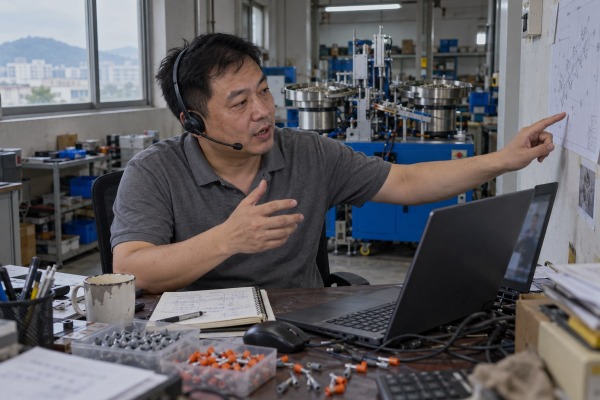
Your machine has landed, but our engineer’s visa hasn’t, so remote installation guidance is now your only path safety warnings 1. I’ve watched that gap stall production for weeks when it’s improvised.
Arrange remote installation guidance by agreeing a written scope, sending site photos and utility data before shipment, scheduling live video sessions with a tripod camera, pausing at hold points, and sending photos or videos of any problem part so supplier engineers can diagnose it online.
A video call alone is not a plan. Below, I walk through how we prepare buyer teams, what documents to demand, how we fix calibration problems from Wenzhou, and which tools and schedules actually work across time zones.
Last year a terminal crimping line shipped to Vietnam with every bolt torqued, but the buyer's team had no tripod and one phone installation pack 2. We lost a full day.
Prepare your team by naming an on-site installation lead and a local safety lead, confirming electrician and mechanic qualifications, completing a site readiness checklist, testing cameras and internet in the machine bay, and rehearsing stop-work commands before the first live session begins.

That lost day taught me something simple. Remote support fails during preparation, not during the call. So before I agree to guide any installation from our side, I ask the buyer to answer one question honestly: is remote guidance even suitable for this machine?
Not every installation should be done this way. Our ferrule assembly machines with two vibratory bowl feeders 3 are modular and well documented, and we have guided the same model remotely many times. That makes them good candidates. A heavily customized multi-station line with hydraulic presses is a different story.
| Condition | Remote guidance works | Use a local specialist or hybrid model |
|---|---|---|
| Equipment type | Modular, repeatable steps, documented | One-off, complex alignment, high pressure |
| Site team | Qualified electrician and mechanic available | No competent installer on site |
| Risk of error | Manageable, reversible | Injury, fire, major damage possible |
| Regulation | Local rules allow supplier-guided work | Inspection or certified attendance required |
| Supplier history | Has supported this model remotely before | First time, cannot review site adequately |
The hybrid model is the one I recommend most. We do the design review and commissioning remotely. A local contractor handles lifting, anchoring, and the electrical connection under local code. Nobody pretends a camera replaces a licensed electrician.
Write down who does what. The list is short but it matters:
The on-site lead must have real authority to pause. I tell every buyer this directly. If the drawing says one thing and the floor says another, stop and show me. Our engineer will never push a team to continue just to save the schedule.
Floor plan with the machine location. Voltage and current capacity at the connection point. Compressed-air pressure and flow. Photos of the foundation and the access route, with a tape measure in frame. A short walkthrough video. The names and qualifications of the people who will be on the floor. We review all of this before the crate leaves our bay. It catches the undersized air line or the missing earth point while the fix still costs nothing.
A distributor in Mexico once asked me for "the manual." I sent eleven controlled files instead, and his electrician thanked me before the first session.
Request a revision-controlled installation pack: assembly drawings, wiring and pneumatic diagrams, packing list, tool and torque specifications, software and firmware versions, configuration backups, safety warnings, sample-test records, inspection forms, a troubleshooting guide, and escalation contacts, all matched to your machine's serial number.

Here is why a single PDF is dangerous. Our machines are built to the customer's drawings, not a catalog. Two ferrule machines can look identical in a photo and still differ in bowl-feeder tooling, sensor positions, and PLC parameters. A generic manual will send your electrician to the wrong terminal block.
| Document | Why you need it | Red flag if missing |
|---|---|---|
| Assembly drawings with revision number | Matches physical parts to the exact build | Drawing date earlier than the sample test |
| Wiring and pneumatic diagrams | Lets a local electrician work to code without guessing | Diagram shows components not on your machine |
| Packing list and bill of materials | Damage and shortage check at unpacking | Quantities don't match the crate |
| Torque and leveling specifications | Bowl feeders are sensitive to base flatness | "Tighten firmly" instead of a value |
| Software and firmware versions plus config backup | Restores known-good state after any change | No backup file supplied |
| Sample-test records and video | Shows the cycle rate and output we achieved before shipping | No evidence of pre-delivery testing |
| Inspection and Site Acceptance Test forms | Defines what "done" means | Acceptance criteria left vague |
The sample-test record is the one buyers forget to ask for. Every machine we ship goes through sample testing with the customer's own parts and our in-house tooling. That test video becomes the reference during commissioning. If your line runs slower or jams where ours did not, we compare the two and find the difference fast.
Ask for the current revision number on every file. Do not let anyone edit supplier drawings on site. If a deviation is needed, record it on a separate sheet and get written approval. Your installer and our remote engineer must be looking at the same page, literally.
For longer sequences, I now send numbered digital work instructions as short step videos. A buyer in India can follow the mechanical assembly at his own pace overnight, then join a live session for the steps that need approval. Where the buyer's PLC logic is complex, a virtual commissioning pass 4 against a 3D model or digital twin lets us check interfaces and clearances before anything is powered. It is not magic, and it needs decent bandwidth, but it removes a lot of first-energization surprises.
Most wobbling bowl feeders we've diagnosed remotely were leveling problems, not design flaws. We learned to ask for a short video before anyone touches a parameter.
Troubleshoot remotely by sending the supplier clear photos or a short video of the faulty section, then joining a live video session where the engineer checks leveling, sensor alignment, air pressure, and parameters step by step; most calibration and stability issues resolve this way without a site visit.

My honest position is this: remote meetings or video guidance solve the large majority of issues we see after shipment. For small problems, the buyer sends photos or a video of the affected part, and our technical staff work through it online. A visit is the exception, not the default.
| Symptom | What to film | Likely cause | Typical remote fix |
|---|---|---|---|
| Parts jam at bowl exit | Track outlet and part orientation | Base not level, track gap drifted | Re-level, reset gap to drawing value |
| Inconsistent crimp or press depth | Pressure gauge and tooling contact | Air pressure low, tooling seat loose | Confirm supply pressure, re-torque to spec |
| Random cycle stops | HMI alarm screen, sensor LEDs | Sensor misaligned or dirty | Realign to marked position, clean lens |
| Output drifts after an hour | Vibration and temperature at the frame | Anchoring loose, feeder amplitude too high | Tighten anchors, reduce amplitude setting |
Where the buyer allows it, we use a secure remote connection to the PLC through an edge gateway with multi-factor authentication. Our engineer can read parameters and run the built-in self-diagnostic routines that check sensor states and valve response without anyone touching the panel. Some buyers add simple vibration and temperature sensors 5 on the frame during the first week of startup. The trend data tells us whether a stability issue is thermal, mechanical, or electrical before we open the cabinet.
One buyer objection I hear is fair: "Your camera cannot see what a visiting engineer would feel." True. So we compensate with numbers. Instead of asking if the base feels level, we ask for a spirit level reading in two axes. Instead of asking if the air is fine, we ask for the gauge value under load. Measurements replace touch. When the numbers match our sample-test record and the fault remains, that is the signal for a hybrid visit from a local partner.
Between Wenzhou and Mexico there's a fourteen-hour gap. I weigh a live session against an asynchronous video every time we plan a commissioning window.
Use a stable video platform with screen sharing for live sessions, a tripod phone plus a second close-up camera, a shared action log, and asynchronous video messages for off-hours steps; schedule two-to-three-hour overlap windows, define hold points per session, and agree an escalation contact.

The trade-off is simple. Live sessions give real-time technical support and instant approval at hold points. Asynchronous video gives the site team freedom to work at their own pace and keeps our engineers out of 3 a.m. calls. A good plan uses both.
| Tool | Best for | Limitation |
|---|---|---|
| Video conferencing with screen share | Parameter setup, HMI walkthrough, hold-point approval | Laptop camera is useless for mechanical work |
| Phone on tripod plus second phone | Remote visual assistance during assembly and wiring | Needs charging access and a quiet corner |
| Smart glasses or head-mounted camera | Hands-free wiring inside a cabinet | Battery life, cost, bandwidth hunger |
| Augmented reality support with annotations | Pointing to a specific terminal or fastener | Expensive, hard to deploy in low-signal plants |
| Asynchronous video messages | Off-hours mechanical steps, training clips | No instant approval; must stop before hold points |
| Shared action log in a field service management tool | Tracking open issues, approvals, who owns what | Only useful if both sides actually update it |
My rule for the camera: show what the installer must do, not that the installer is there. We agree a few commands before we start. "Stop." "Hold position." "Show label." "Zoom out." Then we use closed-loop communication on every critical step. I give the instruction. The on-site lead repeats it. The installer confirms the action. I verify on camera. It feels slow for the first ten minutes and then saves hours.
For a buyer in Mexico or Canada, we book the live window at their early morning, which is our evening. Two to three hours is the useful maximum. Longer calls get sloppy. The schedule for a typical automation cell looks like this:
Connections drop. Phones overheat. So we ask for a second internet source, spare batteries, and printed copies of the current drawings on the floor. We also name a second engineer on our side. And we put the support terms in the purchase agreement: how many sessions are included, the response time, who pays if a part is damaged, and whether a hybrid visit is an option. An installation passport, meaning a dated log with photos at every hold point, is what you show your insurer and what we use for warranty. Treating remote installation guidance as a documented control plan, not a favour, is what keeps the cheap option from becoming the expensive one.
When our engineer can't fly, don't improvise. Prepare the site, demand controlled documents, send photos before adjusting, and run guided sessions with hold points. That's how remote works.
Interested in sourcing the products mentioned in this article? See details and request a quote here:
1. U.S. agency providing safety standards for industrial machinery and emergency control systems. ↩︎
2. International standard-setting body for technical documentation, including engineering and pneumatic diagrams. ↩︎
3. Defines the industrial automation components used for orienting and feeding parts in assembly lines. ↩︎
4. Professional association for electronic and electrical engineering, covering advanced simulation and commissioning technologies. ↩︎
5. National institute providing technical standards for measurement and sensor calibration in industrial applications. ↩︎
