

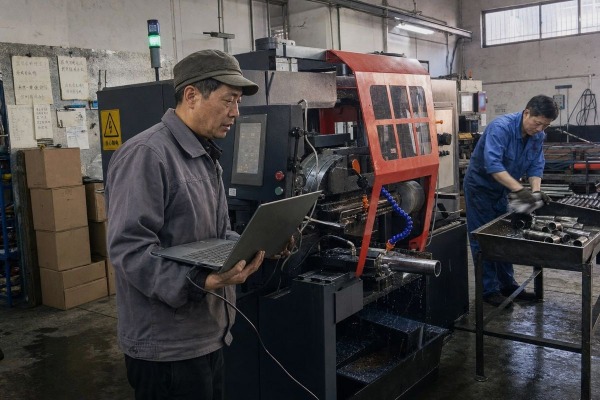
A buyer once asked me if our automatic pipe cutting machine could be fixed from China while running in his Ohio plant. That question exposes a costly assumption many buyers make.
Yes, most modern automatic pipe cutting machines support remote diagnostics through their CNC control system, and many support vendor-assisted software upgrades. However, capability varies by model. Buyers must verify PLC remote connectivity, network interfaces, and the exact remote access method before purchase.
Let me break this down properly. I will cover [downtime](https://yqunique.com/?p=5787) reduction, upgrade procedures, our support options, and network compatibility. Each section answers one practical question you should ask before signing a purchase order.
At our Wenzhou factory, before we quote any connected machine, we run through a fixed checklist: confirm exactly which functions remote diagnostics includes, check whether the PLC supports remote connection, verify the machine has a network interface 1, and agree on the remote access method. That checklist exists because downtime is where buyers feel real pain.
Remote diagnostics reduces downtime by letting engineers inspect alarms, I/O states, error logs, and live operating data without traveling to your site. Industry data shows more than 90 percent of downtime cases can be resolved remotely, cutting waiting time from days to hours.

Downtime on a pipe cutting line rarely comes from one dramatic failure. In our experience, most stoppages come from small issues: a misconfigured parameter, a sensor reading out of range, or a part program error. Without remote access, every one of these needs a technician visit or a long email chain with photos. With remote access, our engineer connects to the CNC control system and sees the same screen your operator sees.
Remote diagnostics is not one single feature. It is a bundle of visibility tools. Here is what leading systems typically expose, and what we build into our own equipment:
| Diagnostic Function | What It Shows | Downtime Impact |
|---|---|---|
| Live I/O status | Sensor and actuator states in real time | Pinpoints failed sensors in minutes |
| Alarm and error history | Fault codes with timestamps | Reveals recurring problems, not just the latest one |
| Runtime and cut counters | Pierce count, cutting time, blade usage | Enables predictive maintenance scheduling |
| Parameter history | Recent setting changes | Catches accidental operator misconfigurations |
| Machine logs | Full event sequence before a fault | Speeds up root-cause analysis |
MicroStep reports that more than 90 percent of downtime cases are resolved without an on-site technician using this approach. Machitech's controller similarly allows support to connect directly without a site visit, tracking live I/O states, pierce count, and runtime. EMCO frames its remote maintenance service the same way: faster analysis means faster resolution.
The bigger shift is from reactive to proactive service. Real-time monitoring of parameters like motor load lets Industrial Internet of Things platforms 2 flag mechanical wear before it stops production. That is the Industry 4.0 integration 3 promise in practical terms: your service model moves from "call when broken" to scheduled, predictive interventions. For a distributor or plant running continuous production, that shift alone often justifies the connectivity option.
A German distributor we work with once delayed an order for two weeks over one question: would future software versions require flying an engineer to his customers' sites? It was the right question to ask, because the honest answer is "it depends on the update type."
Yes, most software upgrades can be installed remotely or by your own staff with vendor guidance. Controller software patches, cutting programs, and parameter updates transfer over a network connection. However, major firmware flashes, PLC changes, and safety-related updates may still require on-site work.

Here is the distinction that marketing pages often blur: remote diagnostics and software upgrades are two different capabilities. A machine may let a technician view alarms and logs remotely but still require a site visit for a deep firmware flash. When I review competitor documentation, I notice diagnostics is documented clearly while update procedures are often vague. That gap is where buyers get surprised.
Not all updates carry the same risk or the same delivery method. We separate them into four categories:
| Update Type | Typical Delivery | Remote-Capable? | Risk Level |
|---|---|---|---|
| Cutting programs and job files | Network transfer or USB | Yes, fully | Low |
| HMI and application software patches | Vendor service connection | Yes, usually | Low to medium |
| Firmware updates for drives and controllers | Vendor-assisted remote session | Sometimes | Medium |
| PLC logic and safety-related changes | On-site or supervised remote flash | Rarely fully remote | High |
There is real precedent for automated update workflows. Vernon Tool's computerized pipe cutting machine specifications explicitly state that the machine automatically loads a new operating system. Watts Specialties bundles remote pipe cut programming and job management into its software. So the industry direction is clear: over-the-air update mechanisms are arriving, even if they are not yet universal or fully automatic across all models.
On our equipment, PLC integration is designed so that application-level updates travel through a secured service connection. We prepare the update package, your operator confirms the machine is idle, and we push it during an agreed maintenance window. For firmware updates touching motion control, we walk your technician through the process on a live video call rather than flashing blind. That protects your machine and your production schedule.
One lesson we learned early in exporting to the United States, Germany, and Japan: a ten-person team cannot fly engineers around the world every time a parameter drifts. So we built our remote technical support model deliberately, and it starts before the machine ships.
YQUNIQUE offers tiered remote technical support: live video troubleshooting, direct PLC and controller access through a secured connection, remote parameter adjustment, guided firmware updates, and scheduled preventive check-ins. On-site service remains available for mechanical failures and installations that remote tools cannot solve.

Our support philosophy follows a simple escalation ladder. Each level solves progressively harder problems, and most cases never reach the top.
We take a conservative position on remote access. The connection is initiated from your side, sessions are time-limited, and access requires authentication. Cybersecurity specifics vary by plant policy, so we treat this as a joint configuration exercise, not a default-open door. That balance between convenience and security is an industry-wide consideration, and we would rather be strict than sorry.
Because we support OEM/ODM custom builds, the remote support scope is defined in writing before delivery. You know exactly which functions are remotely serviceable, which need your electrician, and which need us on-site.
The trade-off we weigh on every export project is this: deeper connectivity gives better predictive maintenance data, but it demands more from the customer's network and IT policy. Before shipping to a plant in Mexico last year, we spent more time on the network survey than on the crating.
Most factory networks are compatible if they provide a stable Ethernet connection, outbound internet access, and IT approval for a secured remote channel. Compatibility depends on your PLC's remote connection support, the machine's network interface, and your firewall policy, all verifiable before installation.

This is exactly why our pre-sales checklist asks four questions in order: What does remote diagnostics actually include on this model? Does the PLC support remote connection? Does the machine carry a network interface? And what remote access method will the plant permit? If any answer is unclear, we resolve it before the machine leaves Wenzhou, not after it lands.
| Requirement | Minimum | Recommended | Why It Matters |
|---|---|---|---|
| Physical connection | Ethernet port near machine | Dedicated industrial LAN segment | Stable link for real-time monitoring |
| Bandwidth | Standard broadband | Stable low-latency connection | Live video and log transfer |
| Access method | VPN or vendor service router | Customer-initiated secured tunnel | Meets most corporate IT policies |
| Firewall policy | Outbound HTTPS allowed | Whitelisted service endpoints | Enables cloud-based troubleshooting |
| IT approval | Written remote access policy | Named contact in IT department | Prevents deadlock after installation |
A common buyer objection is bandwidth: will monitoring flood the plant network? In practice, no. Modern architectures use an edge-to-cloud hybrid model. Safety-critical decisions run locally on the CNC control system in real time, while heavier diagnostic analytics are batched to the cloud. Centralized data logging of idle time and material consumption then feeds OEE analysis 4 across multiple facilities, which matters if you run more than one plant.
One caution against overpromising: some SERP-level claims, like blockchain-verified firmware integrity or digital twin rehearsal of every update, describe emerging or high-end capabilities, not standard features on mid-range pipe cutting machines. We tell buyers plainly which Industry 4.0 integration features our machines include today and which belong to a future roadmap. Verify the spec sheet, not the buzzword.
Unverified connectivity claims cost buyers real downtime. The fix is simple: confirm diagnostics scope, PLC remote support, network interface, and access method in writing before purchase.
To recap the full picture: modern automatic pipe cutting machines widely support remote diagnostics, and the numbers back it up, with over 90 percent of downtime cases resolvable without a site visit. Software upgrade capability is real but more model-specific, ranging from automatic operating system loading on some machines to vendor-assisted firmware updates on others. Remote diagnostics and software upgrades are separate capabilities, so verify both. Network compatibility is rarely a blocker when checked early, and secured, customer-initiated access satisfies most IT policies. At YQUNIQUE, we define the remote support scope for every custom machine before it ships, so procurement managers know exactly what "connected" means on their invoice. If you want the four-question checklist we use internally, reach out and we will walk your project through it.
1. Wikipedia provides a stable, authoritative definition of network interfaces for industrial and computing hardware. ↩︎
2. Comprehensive Wikipedia entry covering IIoT platforms, architectures, and industrial applications. ↩︎
3. Detailed explanation of Industry 4.0 integration and its role in the digitalization of manufacturing. ↩︎
4. Standard definition and methodology for OEE analysis in industrial production. ↩︎
